Pages

Showing posts with label flipping. Show all posts

Sunday, 16 August 2015

Forms - fit for purpose.

One of the most under-utilised apps of the google suite is the google form.  I blogged earlier this year on how I used a form, embedded in my appraisal site, to collect my professional development.  But the form doesn't have to be embedded in a site.
If you or your students have ipads or even phones in your class, download a QR code reader like Quickmark or QR Reader so that when you produce a QR code then the students can go straight to a form using the reader,
If your students have emails, it is easy to send a form out.  Otherwise share via a link or QR code.
A really good way to get a link or QR code is to get the Chrome extension goo.gl URL shortener.    When you have made the form live, you just click on the extension and you will get a short URL or a QR code to copy and paste, then print if you need to.
Like this:

Some ways that you could use a form include:
  • Collect information from your parents, students or teachers using a form (emails, addresses, phone numbers etc) .  
  • Take orders for a fundraiser (multiple collectors can get all of the orders in one place, easily)
  • Organise your EOTC trip (eliminate the need for those long letters that get sent home)
  • Write about an image (insert the image into the form)
  • Fill in feedback for student voice on a unit of work
  • Hand in work by inserting a link into the form
  • Do teacher observations which a specific purpose in mind (or walk throughs)
  • Flip your class (add a video)
These are just a few of the myriad of ways that teachers can use forms in their daily work.
The nicest thing about forms is the way that the responses are organised into a spreadsheet.  It is an awesome way to save time and organise.  There are also a number of add ons that you can put into the response spreadsheet to help you even more.  Like the Flubaroo add on which will self-mark short answer or multichoice questions for you.
Go on, give it a go!  You will love forms.

Sunday, 4 January 2015

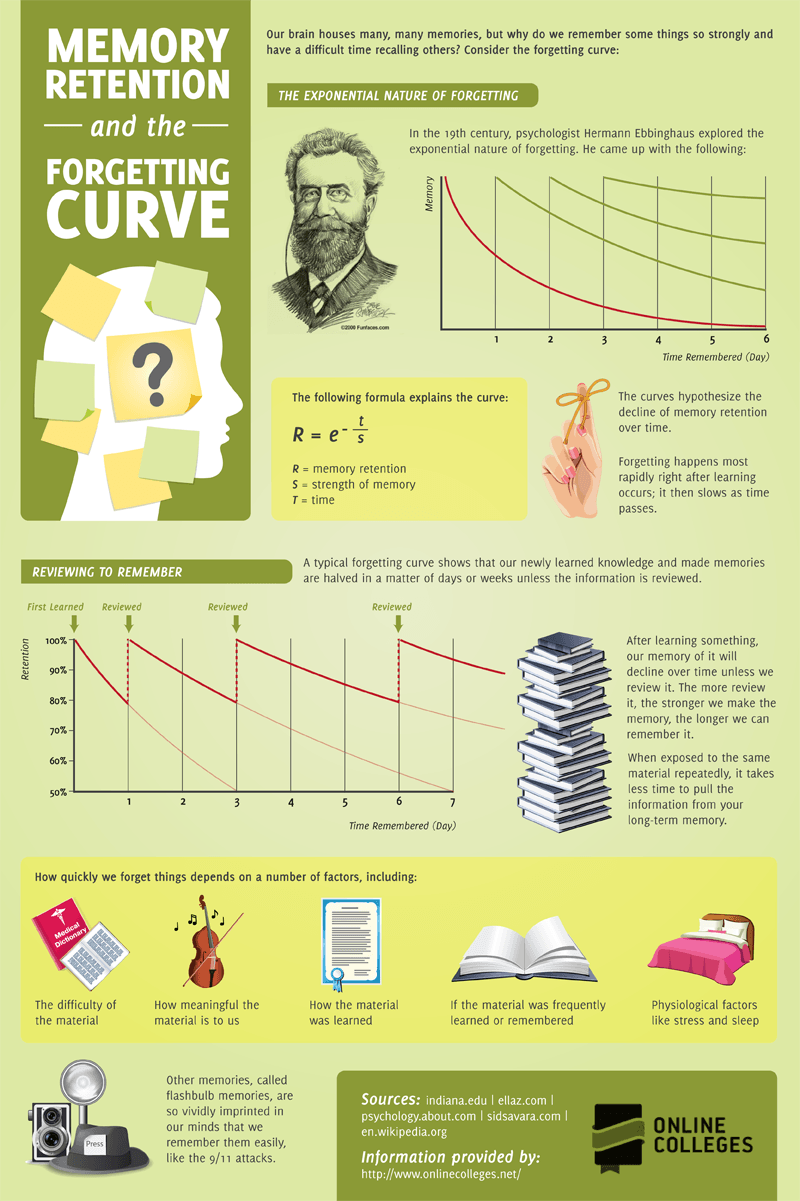
A great infographic from e-learning infographics which explains why flipping your class really works.

This great infographic reminds us of the importance of reviewing what we learn to be able to commit it to memory. This totally explains to me why videos are so good at helping us learn. We can stop, pause rewind, review a video, at our own pace. No teacher interruptions. If we have a video stored in a central place like on a site, this adds to the benefit as we are able to review regularly. Enjoy! Memory-Retention-and-the-Forgetting-Curve-Infographic
Find more education infographics on e-Learning Infographics

Thursday, 16 October 2014

Using Google Apps to Flip Learning in Your Class

As you might know, I am a real fan of flipping the learning. That is, using videos to move the instruction or content(for learning) from the group space into the individual learner space - available 24/7, if and when needed. It is a great step to take toward personalisation of learning. In this post, I am sharing the workshop slides that I did at the Ulearn conference this year. There are two main parts in this presentation after the introductory slides. The first is about using Youtube for editing and the second part is about useful tools to use that integrate well with Google Drive and or Youtube. Please contact me if there are any questions you have about the steps to take toward flipping or about this workshop, and do let me know what successes or failures (which are really just opportunities to learn from experience) that you have. Enjoy!!

Tuesday, 7 October 2014

The good and the bad and the ugly at ULearn Mobile Learning Day 2014

The Good
Today, we kicked off ULearn 2014 in Rotorua with the Mobile Learning Day.  I was clever enough to choose Tom Barrett's workshop on Learning as Inquiry for my first.  Tom had a model of learning through inquiry which was very easy to understand and could be applied to many learning situations.  Along with that model, he had Thing-linked a heap of digital tools which could be used at each stage of the inquiry.  Thanks for such a useful morning, Tom. Here follows a little storify of mainly my tweets as I listened in.  It is really great to be able revisit these tweets alongside his notes.  Great prompts for remembering.

The Bad
By contrast, I became frustrated and even angry at my afternoon workshop where the presenter had quite a few digital tools to address a pedagogy that, it was obvious that she knew very little about.  Now I don't want to sound like a know-it-all but when the tools were being used just for showcasing the tools, the workshop became meaningless.  There has to be some semblance of substance about the knowledge being learned.  You can't crowd-source knowledge for two and a half hours from a crowd that had very little understanding of the topic.  They were there to find out about the topic, and instead got to use some of the tools which could be useful once they had the knowledge.  They made resources based on their lack of knowledge for the rest of the time.
The Ugly
 I hate to see teachers going away from a workshop ill-informed, which is what they would have done.  Teacher pd time is precious, especially for those who have give up out of school time.
I have to admit, my feedback was pretty scathing.  And I am sorry for that,  because it is not easy standing in front of a group of teachers and presenting a workshop. However,  I do hope that she learns from that.  During my teaching life I have been taught to take on board good feedback and discard any negative feedback that you don't think is warranted, but act on what you think is warranted.   You don't need to argue or discuss, just do it.  However part of me still feels ugly for being unkind.
So that's it.  My first day at Ulearn 2014.  The good, the bad and the ugly.

Saturday, 4 October 2014

Some ideas aound flipping your class (or at least the learning.)

The Free Technology for Teachers guru, Richard Byrne, is amazing!  He has a way of quickly reviewing and aligning the functionality of different digital technologies to different educational settings and assessing their usefulness.  He is a must to follow - I have been since about 2009 -  and he never ceases to amaze me with the sheer variety of technologies but more importantly, his clear statements about how he thinks they could be useful in the classroom.

Recently, he has reveiwed 7 tools to use in one of my favourite pedagogies - flipping the learning.  By co-incidence, I also talked to a journalist about flipping.  There seems to be a surge of interest in flipping in New Zealand. Flipping, of course, has evolved so much since the first years when Aaron Sams and Jonathon Bergmann started videoing their Woodland Park, Colorado lessons and posting them online so that students who had been absent through illness or school- based activities could catch up.  They found that all of their students started using the videos for their own learning.

Sams and Bergman started to get the students to watch the videos at home first and then come back to them with any questions the next day at school.  As a result, their lessons evolved into interactive, student centred learning rather than teacher led "lectures. Nowadays the two recommend short videos that engage the students easily, to be watched in their own time.   This approaches a more personalised learning paradigm, or at least an individualised one.

As you start to make the move towards personalised learning in your classes, consider a flipped approach.  It is important that you make use of the relationship that you have with your students to connect with them through video.  Video is a powerful and engaging medium. The flipped learning network is a useful organisation to belong to. They have come up with a great explanation of what they believe flipped learning to be, and an easy to remember mnemonic (FLIP) which characterises the concept.

I am about to run a workshop on Flipping the Learning using Google Apps - it might be worth a look at the slides if you have an interest in  trying flipping out.  I am happy to field questions about this important pedagogical approach.  Happy to help you walk this way.

Have a happy Connected Educator month!