Pages

Friday, 29 July 2016

What a Terrible Infographic!

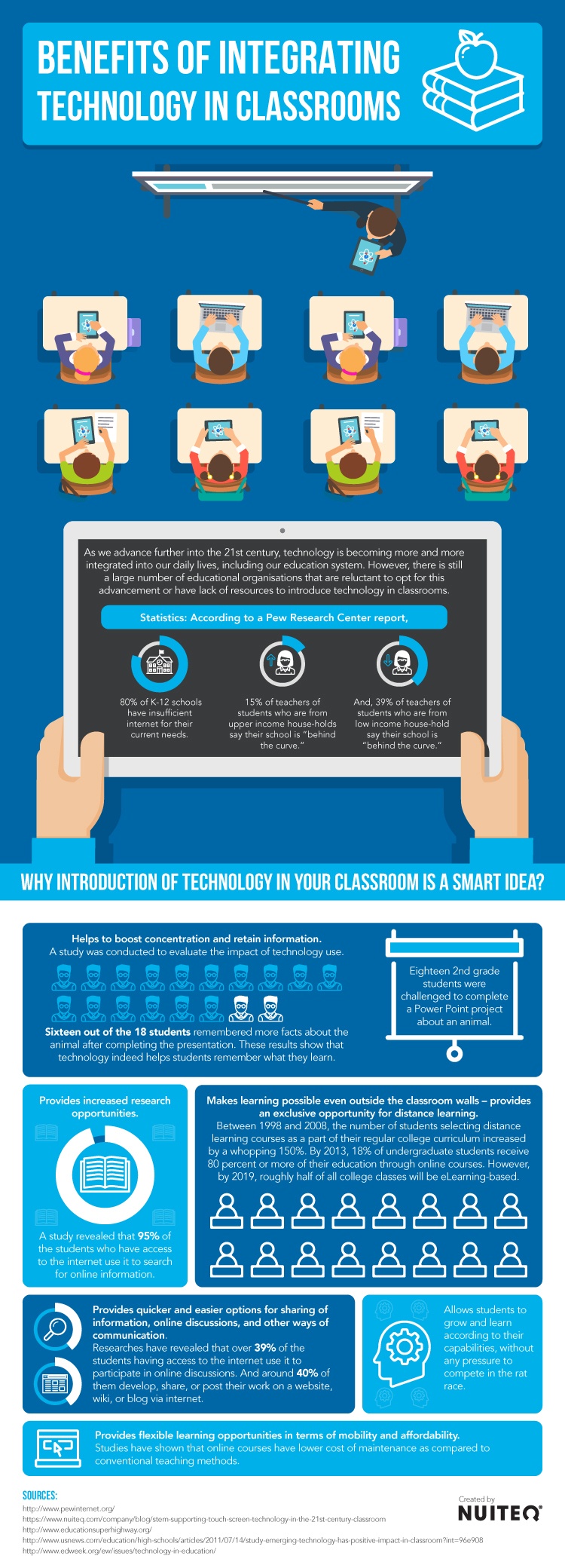
OMGosh can't begin to tell you how bad the content and presentation of this infographic is, considering it is supposed to be representing the benefits of integrating technology in classrooms. Students sitting in rows in a classroom. Really? Teacher at the front - really? How about some modern learning environments? Powerpoint? Really? How about creating their knowledge on a presentation of any kind? Saying 95% are using internet for research - how limiting, how absolutely underwhelming use of the internet , what about activities for learning? (Reminds me of the OECD report that said screen time was bad for students' achievement. Turns out the ones having 4+ hours of screen time AFTER SCHOOL were the ones doing not so well.) Differentiated learning is reported on in a very small corner of the poster - and what about personalised learning? Big let down, this infographic. Benefits of Integrating Technology in Classrooms Infographic
Find more education infographics on e-Learning Infographics


Saturday, 23 July 2016

The Power of A Tweet

I've been feeling a bit down.  On a personal note, my mum died last month.  She was a good old age, nearly 90 and she just seemed to decide it was her time.  Everyone's mum has to die and I am grateful that she kept in pretty good health until the last 3 weeks.

On the work front, I am presently jumping through a series of new hoops to prove that I am a capable facilitator, as the Ministry of Education has decided that all facilitators working in New Zealand schools for MOE centrally funded professional learning must be accredited.  This means showing evidence of meeting the criteria that they have formulated, to be placed on a website so that school leaders can select who they wish to work in their schools, and so I am putting together a Word document (which is the MOE's preferred version of a facilitator's e-portfolio) to show that I meet all 13 criteria.

It is similar to teacher registration - having to show that you meet all 12 of the PTCs except this is not a process over a year. Rather, it is capturing a story that you think shows evidence of you meeting the criteria.   So you tell your story and then try to match the criteria to parts of the story.  Which brings you to a point where you try to elaborate on why it shows evidence of practice.  Which disrupts the flow of the story.

It has meant a lot of teeth gnashing and hair pulling as I rewrite the story trying to forge and fashion a readable piece which truly reflects the way I work.  I have nearly thrown in the towel and said, that is it! No more!  I have cut up the criteria and printed my story and physically sellotaped the criteria onto the story and then in frustration at seeing the criteria met in many other parts of the story, I have screwed that version up, too.

I don't like working this way - I much prefer the powerful multimedia representation of my work that a website like Google sites, or Myportfolio, or a blog can show.  I have come to a dead slow, deccelerating, grinding, and demoralising halt without feeling like I have really represented myself.

This morning I woke to a tweet from the awesome Barbara Bray (see below)
and I thought to myself - wow - that is me! Barbara Bray thinks I am an Amazing Leader!  And in such awesome company.  Oh, the power of that tweet.  I woke up properly and thought, this is all wrong.  The story of my practice should be a celebration of my work, not a dirge.  So I am going to attack it again with a new vigour.  I don't know that it will improve it but the power of that tweet has been enough to inspire me to blog out about it.(I had come to a dead slow deccelerating grinding halt on the blogging front, too).

So thank you, Barbara, for reminding me that praise is so powerful in our lives and in the lives of our learners.  I am reminded of the wise words of a former principal of mine (thank you, too, Josephine!) - appraisal should be all about praise - that's where the word comes from and we should never forget the power of improving our practice through praise for work done well. 


Tuesday, 5 July 2016

Highlights of ISTE - the people you meet.


Standout highlights for me at ISTE were definitely meetings with educators in the digital technology realm whom I have long time admired for their resourcefulness, helpfulness and common sense.
These are some of my favourites.


  • Sue Wyatt +Sue Wyatt - blogger extraordinaire from Australia, running the student blogging challenge
  • Daniel Rezac +Daniel Rezac education technologist and maker, long time facebook friend through EdTech Team
  • Barbara Bray @bbray27 - personalised learning guru and just a downright lovely person
  • Monica Burns +Monica Burns long time clever education technology coach on Simple K12
  • Shelly Sanchez Terrill +Shelly Sanchez Terrell also a clever education tech coach on Simple K12
  • Noah Geisel +Noah Geisel - digital badging, all round clever dicky and nice man
  • Kathy Schrock +Kathy Schrock educator extraordinaire - grand pooh-bah of sharing resources
  • Sylvia Duckworth +Sylvia Duckworth fabulous sketch-noter I have followed for as long as she has been doing it (very surprisingly only 18 months)
  • Susan Oxnevad +Susan Oxnevad - very clever thing-link lady, whom I didn't actually meet but I have followed her webinars and I did watch her in action demonstrating and connected through twitter later.
He aha te mea nui o te ao? He tangata, he tangata he tangata.
What is the most important thing in the world? The people, the people, the people.


ISTE Smackdown unconference

This session follows the smackdown format of 2 - 3 minutes talking by participants who want to share a resource.  Great things to try - depending on your purpose.
1. Moodle adaptation - Troy to make moodle look pretty
2. Google Streetview - can take your own 360 photos click on dots using the + button - must be published.  This I can use!
3. Multicultural ebooks by kids for kids.  Write Our World writeourworld.org
4.  Formative - goformative.com - upload a worksheet - feed comes in as soon as the learner touches the screen.  Looks very cool for teacher directed work.
5. Nicky Bourgeois (NZ teacher teaching in Bangkok) thewonderment.com - connecting with  learners around the world.  Adding a creation makes the wondermeter rise.
6.  Donna Quizizz - similar to kahoot but the questions appear on their devices.  Completely free.
7. Hypothes.is  Open source annotation brings up a side bar with annotations threaded discussions, images etc can go in the side
8.  Kahoot - good for language!
9. Breakoutedu.com collaborative problem solving. - a heap of games online already made up.
10.  Voxer voxer.com combines voice with text, video and photosharing
11. Pobble - Dave Winter! Pobble365.com - a story starter must dos and can dos. creative pictures
12.  Symbaloo - digital literacy - cloud based resource to allow students to access resources - publish and available to students - good way to access work
13. Switcher studio switcherstudio.com
14. Appear.in conference room - up to 8 people in a room
15.CS unplugged  Computer science field guide csfieldguide.org.nz - for CS teachers in NZ Produced by uni of Canterbury.
16.  Writeabout.com -  digital writing for classrooms built in writing prompts. Engage , connect to similar groups,
17. Gretchen Kaizena - voice comments on google docs - helps with formative assessment - can enter rubrics as well and can give feedback via those.


Sunday, 29 May 2016

Changes - the COLS are Coming.

It is a time of change in education.  Big changes.  In New Zealand, we are adopting a new approach for schools.  Instead of being relatively independent entities, schools are being encouraged to join a community of learners (COL) - that is,  a community of schools.  When I say encouraged, I mean that it is not compulsory, but as the Ministry of Education will prioritise any free professional learning for the schools inside a Communities of Learners, it seems pretty imperative to try to join up if you want access to that, for a start.
The idea is that together, the learners (teachers and students) will be able to draw on the strengths of all contributing schools.  Which is admirable - I like this image that was shared with me at a conference last week.  There is a lot of potential for schools to draw on the strengths of others.

The average number of schools in a COL is around 10 and they include primary and secondary schools, so there should be a reasonably wide range of expertise across the schools.  Together the schools are expected to look at their data and formulate achievement challenges which reflect how they will, as a group, improve outcomes for their learners.  The Ministry of Education will then aim to provide the professional development that the community needs, if the expertise is not available in those schools.
The disadvantages that I see coming are firstly that small schools, particularly those which are isolated, will miss out.  These schools have very limited budgets.  Often their clientele migrate to far off boarding schools and so they are not feeder schools for any secondary schools and so they are unlikely to be able to form a COL easily.
In addition, when communities of schools are in close proximity to each other,  they will likely adopt the "flavour" of that community.  I believe this means that in a low socio-economic region, the school will likely adopt a low socioeconomic outlook and likewise for high socioeconomic areas.  Personally, I would like to see a lot more cross pollination of ideas and resources that can help raise achievement for the learners.  The way that the COLs "form, storm, norm and perform" and develop their collaborative identity will be crucial to avoid glitches caused by competition and ego clashes.
These are my initial thoughts around the COLs and I do realise that the landscape is changing by the day.  I welcome any feedback and discussion on this subject.

Why Do Learners Engage in Learning?

This infographic gives us 26 tips on why humans engage in learning.   I am sure a lot of these resonate with us as teachers.  They are as follows:  I wonder if you can think of other reasons why your learners engage in learning.

  1. Compliance.
  2. Gap Awareness.
  3. Curiosity
  4. Intrigue
  5. Challenge
  6. Craftsmanship.
  7. Contribution.
  8. Authentic.
  9. Reflection.
  10. Consequence. 
  11. Fear. 
  12. Burn.
  13. Collaboration. 
  14. Competition. 
  15. Flow. 
  16. Fun. 
  17. Agency. 
  18. Teaching. 
  19. Empathy. 
  20. Narrative. 
  21. Feedback
  22. Affection. 
  23. Reward. 
  24. Cause. 
  25. FOMO. 
  26. Connection.26 Impulses that Sustain Engagement Infographic

Find more education infographics on e-Learning Infographics

How nice!

I was in a school today where the teacher asked me if I wouldn't mind answering some big picture questions about the use of digital technologies for learning.  Now this is more like it!