Hynessight: And here are the slides from my Google presentatio...
Please use and enjoy these slides from my Google Summit presentation.
Wednesday, 30 April 2014

Wednesday, 23 April 2014
Google Apps for Education Summit in Auckland

Google Drive is cloud based. That means you might need some of the many apps, add-ons and extensions to enhance the functionality in the cloud. Luckily you can add these and customise your Drive and Chrome to suit your own needs.
Drive Apps (- add to your Drive by pressing the Create button, then " Connect More Apps," choose the app you want from the many available and allow it to have access to your Drive).
Here are some of my favourites.
- Pixlr Photo Editor - allows you to readily edit your photos and save them to your drive. Has many fun options for your photos.
- VideoNot.es allows you to watch a video from Youtube or Vimeo and some other platforms while taking notes at the same time. The notes that you take are timed so you can look back at your notes, click on the relevant note and go to the correct time in the videos. An awesome app for getting the most from your video. Could be used in research or with older students to analyse videos. Notes are saved in Drive and you can share and collaborate.
- MindMups - a mind-mapping tool, so easy to use and the mind maps are saved in Drive as well. Awesome for all age students who like to brainstorm collaboratively. You can add images and links and re-organise your mindmups easily. Saved in Drive also.
- MoveNote - quickly make a screen-cast using your personlised instructions from the camera, and photos, documents or slides from your computer or from your Drive. Send the link to the Movenote to others or embed it in a website or blog, or you can save back to Drive as an mp4 file.
- Kaizena - voice comments for google docs. Easily and quickly add in voice comments, and send them back to the people who are collaborators on the document. When the collaborators look at their comments, they are redirected to Kaizena where the voice, text and links are accessible by clicking on the highlighted section. Great for commenting on student work. You can also add in text and links to resources if you want to.
- Templates There are thousands of templates which are available at the push of the Create button. You can make your selection from those listed as educational or any of the other categories.

Docs and Spreadsheet Add-Ons
The add-ons are now part of the dropdown menus of Docs and Spreadsheets and once you allow permissions, they are available for you to use every time you create docs and spreadsheets. Simply click on Add-ons, then Get add-ons from the drop-down menu and browse through to find what suits you.
The add-ons are now part of the dropdown menus of Docs and Spreadsheets and once you allow permissions, they are available for you to use every time you create docs and spreadsheets. Simply click on Add-ons, then Get add-ons from the drop-down menu and browse through to find what suits you.
- Easybib allows you to get referencing in APA format - great to teach students how to be digital citizens by referencing their work.
- Thesaurus just highlight the word you want a word for and click on the thesaurus add-on and you will be given a number of word options to choose from.
- Open clipart - quite often teachers and students want to use a bit of clip art just to jazz up their presentations. Of course it is preferable for them to create their own images but this alternative offers hundreds of open sourced clips when they are in a rush.
- Maps - when you put an address into your document and highlight it, this add-on allows you to highlight it and get a map to quickly insert
- Flubaroo is a great script which is now an add-on for sheets and can be used to set up self-marking quizzes. It is easy to use, just follow the instructions. (I tried it, it works) Hurrah for anything that saves time for teachers.
Chrome Extensions - these go hand in hand with Google Chrome browser which I find definitely the best browser and getting better all the time. Chrome extensions are great because once you have set your preferences, they follow you to every computer that you use, as long as you sign in to Chrome. Chrome is so easy, even your preferred theme is saved so you always feel at home. Some of the extensions that I find most useful are here:-
- Snagit - a Techsmith extension to capture and annotate your screenshots and store them in Drive.
- Clearly which will take out all the ads and other page "noise" on websites to give you a nice clean document that you can read easily, or save to Evernote for later reference.
- Evernote clipper - will take parts or all of pages and save them in Evernote. You can annotate and edit the clippings.
- Diigo - social bookmarker - I have another blog on this fabulous feature
- Feedly - a reader which collects all your favourite blogs and websites and allows you to access them and read in one easy place to find.
Other apps can be accessed through your New Page Tab. Some of the ones that I use are
- Readium - for reading (ePub) published books
- Gifpal - for making Gifs that you and your students can embed in your blogs and or websites, like this one of my dog Sally.

There are thousands more of these apps, add-ons and extensions which are so great for working with Google and Google Chrome. All I can say is get out there are try some!
Monday, 31 March 2014
Goldilocks can teach educators about learning.
I learn about hundreds of new things every week. I peruse a list of items, articles, how to's and latest news on my reader "Feedly". (It used to be Google Reader but sadly they dropped that.) When perusing, the trick is to filter out what is not immediately useful, and store other stuff somewhere (usually in Diigo) for future reference in the hope I can remember it when the time comes. Tags are great. They help you search for stuff that you may not immediately remember what it was that you are thinking of. Does that even make sense?
Another trick in my job is not to overload other people when it is not useful. This is called "PD just in time." You are much more likely to remember stuff when you have to use it for some specific purpose. The same applies to learning with students. Too much stuff becomes boring and pointless unless you are going to use it.
Our school curriculum in New Zealand is great. There is so much scope to choose contexts that will be relevant for every student. To personalise the learning, we need to use digital technologies. This allows students to learn along their own pathways but it does add to the teachers' burdens. When is "not enough" guidance, when is" too much", when is it "just right?"
I have been mulling over this question this morning, in response to an educator, Kevin Schindel, who in his blog on A New Class Project reflects whether some educators trying to develop 21st Century skills rely too heavily on the technology to be able to take over the role of the teacher.
I also read a blog by Charlotte French on "Student Agency vs Student Anxiety" this morning which really asks the question 'How much should a teacher really let go?'. Her year 13 students want the right answers rather than having to construct the answers themselves. Of course, they are preparing for NCEA assessments, so of course they want the 'right' answers. Just how much does assessment detract form solid learning. Another similar vein was raised by Heather Eccles in her blog "Good Results Do Not Necessarily Mean Good Teaching" and I could not agree more. I just have to share this video.
Another trick in my job is not to overload other people when it is not useful. This is called "PD just in time." You are much more likely to remember stuff when you have to use it for some specific purpose. The same applies to learning with students. Too much stuff becomes boring and pointless unless you are going to use it.
Our school curriculum in New Zealand is great. There is so much scope to choose contexts that will be relevant for every student. To personalise the learning, we need to use digital technologies. This allows students to learn along their own pathways but it does add to the teachers' burdens. When is "not enough" guidance, when is" too much", when is it "just right?"
I have been mulling over this question this morning, in response to an educator, Kevin Schindel, who in his blog on A New Class Project reflects whether some educators trying to develop 21st Century skills rely too heavily on the technology to be able to take over the role of the teacher.
I also read a blog by Charlotte French on "Student Agency vs Student Anxiety" this morning which really asks the question 'How much should a teacher really let go?'. Her year 13 students want the right answers rather than having to construct the answers themselves. Of course, they are preparing for NCEA assessments, so of course they want the 'right' answers. Just how much does assessment detract form solid learning. Another similar vein was raised by Heather Eccles in her blog "Good Results Do Not Necessarily Mean Good Teaching" and I could not agree more. I just have to share this video.
Probably the 5 minute university is just not quite enough. But how much is too much? Are we expecting too much of our teachers? Their roles as facilitators of learning requires them to be educated and trained in their fields, adept with digital technologies, and really overseers of the whole class of learning pathways every single year. That is a pretty big job, don't you think?
Friday, 28 February 2014
Principals, Schools and Communities Held to Ransom
What is the problem? As I go into a lot of schools across the country, it is evident that there is a real problem holding up progress for the successful implementation of digital technologies into classroom practice for learning. This problem is the source of a mountain of barriers that educators come to when they find they they don't have access to all the resources that they need in the short time that they have for preparation or learning how to use a new bit of software.
These barriers have been put in face by their "friendly" technical staff.
Now I must make it clear from the outset that not all technicians are tarred with the same brushes. There are some fabulous technicians out there whose businesses are booming because they make digital technologies so easy for teachers and principals.
But there are too many who do not. They might be school based or they might be local or distance companies who hold the passwords and keys that the educators and their learners need. I am not talking about firewalls which are absolutely necessary to protect students. I am talking about the holding of the balance of power in the school when it comes to using digital technologies for learning.
Some examples I have personally encountered in schools are:
These barriers have been put in face by their "friendly" technical staff.
Now I must make it clear from the outset that not all technicians are tarred with the same brushes. There are some fabulous technicians out there whose businesses are booming because they make digital technologies so easy for teachers and principals.
But there are too many who do not. They might be school based or they might be local or distance companies who hold the passwords and keys that the educators and their learners need. I am not talking about firewalls which are absolutely necessary to protect students. I am talking about the holding of the balance of power in the school when it comes to using digital technologies for learning.
Some examples I have personally encountered in schools are:
- Technicians advising and pushing schools which devices to buy, often whole sets of tablets, or only certain platforms that they can configure and maintain, and sometimes devices which are just not suited to learning. Schools are at the mercy of these sales-oriented people pushing their own products and planning their future business around ongoing maintenance issues.
- Technicians advising which software to use for learning including one who said that Myportfolio should not be used as it was too difficult to set up in the school.
- Technicians preventing teachers from being administrators of the TELA laptops that they use. (And sometimes advising principals that this is the right thing to do.) Then teachers are unable to download software for their printers at home or any programme that they would like to investigate for use in the classroom. And, what a coincidence, the technician can charge for the time to install these programmes for the teachers. If you sense a touch of cynicism there, you are on the right track.
- Technicians being the only people administering passwords for teachers and students so that no one can get on the system unless they are around AND technicians not providing passwords unless personally advised by the principal.
- Technicians locking up servers and software with passwords that they fail to release to principals, and then leave, when they fall out with the school personnel, leaving all systems locked up and tied up so tightly that they school has to spend even more $$$ on new technicians to untangle the unholy mess.
Why it is wrong. For a start technicians are not teachers for the most part - why would they feel they should choose the right products for learning? The teaching professionals are the ones who should be allowed to do this. Sure, show them how things work, but give them the opportunity to compare and contrast before they make their decisions.
I just don't get it. There is a relationship of trust between a school and a technician or tech company to do the right thing when you are paying for their services. Its like paying for a painter to paint your bathroom. You trust that the painter will use his expertise to allow you to choose the right paint, also the right colour of paint, offer to you to include a fungicide with the paint and recommend to seal the bathroom beforehand to prevent water damage so that down the track you don't find that the paint peels off in the humidity or gets covered in unsightly mould. You don't invite that same painter back to do other rooms in your house if you find he stuffed up first time, just went ahead and painted the bathroom his favourite colour and didn't put fungicide in it because you didn't ask for it.
What should happen.
Principals: Trust your teachers. Ask around other principals and teachers outside your schools about the effectiveness of certain devices. Don't jump on the local bandwagon of getting a certain device without some thorough research on alternatives. Get a variety of devices - that is what students will come across when they go into the workplace. Join the VLN or twitter and start asking questions across New Zealand.
Teachers: Ask for (and demand) full access to all software you want to use for learning (You wouldn't accept a textbook in your class that had some of the pages bound up so you couldn't even see them let alone judge if they were suitable for your students.) Form networks with other teachers from other schools to see what they use and what barriers there are. Join the VLN. Start tweeting and asking questions.
Technicians: Build your business around making things work for teachers and schools, not tying them up so you are the resident "expert" who must be consulted at all times.
I am not saying all technicians are the same. I am not saying they even do these things knowingly and deliberately in some cases. What I am saying is that technicians are the key people in making systems workable for schools, principals, and teachers, and they should be doing their utmost to make access to technology for education a piece of cake, not an ongoing source of income for their own ends.
I am really interested to know if you have come across this problem.
Sunday, 2 February 2014
Copyright
There's a new round of interesting challenges flooding Facebook at the moment. It involves sharing an artist's name and the recipient (or liker of your post) has to find a work on Google by that artist and put it up on facebook and the first person who likes that artwork, receives another artist's name to continue the game. I guess its kind of like a chain letter.
I like lots of different art, so was tempted to join in, and then realised the difficulty in getting permission to use the images so pulled out. What a plonker they probably think I am. But it really is a dilemma. How can I go round espousing the responsibilities of digital citizens if I don't play by the same rules?
The images on facebook are sometimes directly from the artist and usually require specific permission. Sometimes they have been copied - and then who owns the rights? Is it the original artist who may or may not have given permission or is it the copier who may have used it and adjusted it in some way?
And then there is the issue of all the shared jokes and stories. Are we allowed to share them? What a can of worms!
Creative Commons, I hear you all saying. But these copyright-free or otherwise images do not often contain the very art that you desire. I also need to learn a lot more about how long after death copyright is still an issue.
A hint that I can give about searching for suitable images: Make sure you search images using google Search Tools that give you appropriate permissions.
 And when you find an image that suits you, check again on the image details, by visiting the page the image is sourced from. You may find that all rights are reserved, like in this one.
 It is not as straight forward as you would hope. Dammit!
I like lots of different art, so was tempted to join in, and then realised the difficulty in getting permission to use the images so pulled out. What a plonker they probably think I am. But it really is a dilemma. How can I go round espousing the responsibilities of digital citizens if I don't play by the same rules?
The images on facebook are sometimes directly from the artist and usually require specific permission. Sometimes they have been copied - and then who owns the rights? Is it the original artist who may or may not have given permission or is it the copier who may have used it and adjusted it in some way?
And then there is the issue of all the shared jokes and stories. Are we allowed to share them? What a can of worms!
Creative Commons, I hear you all saying. But these copyright-free or otherwise images do not often contain the very art that you desire. I also need to learn a lot more about how long after death copyright is still an issue.
A hint that I can give about searching for suitable images: Make sure you search images using google Search Tools that give you appropriate permissions.
Friday, 31 January 2014
Blog Envy
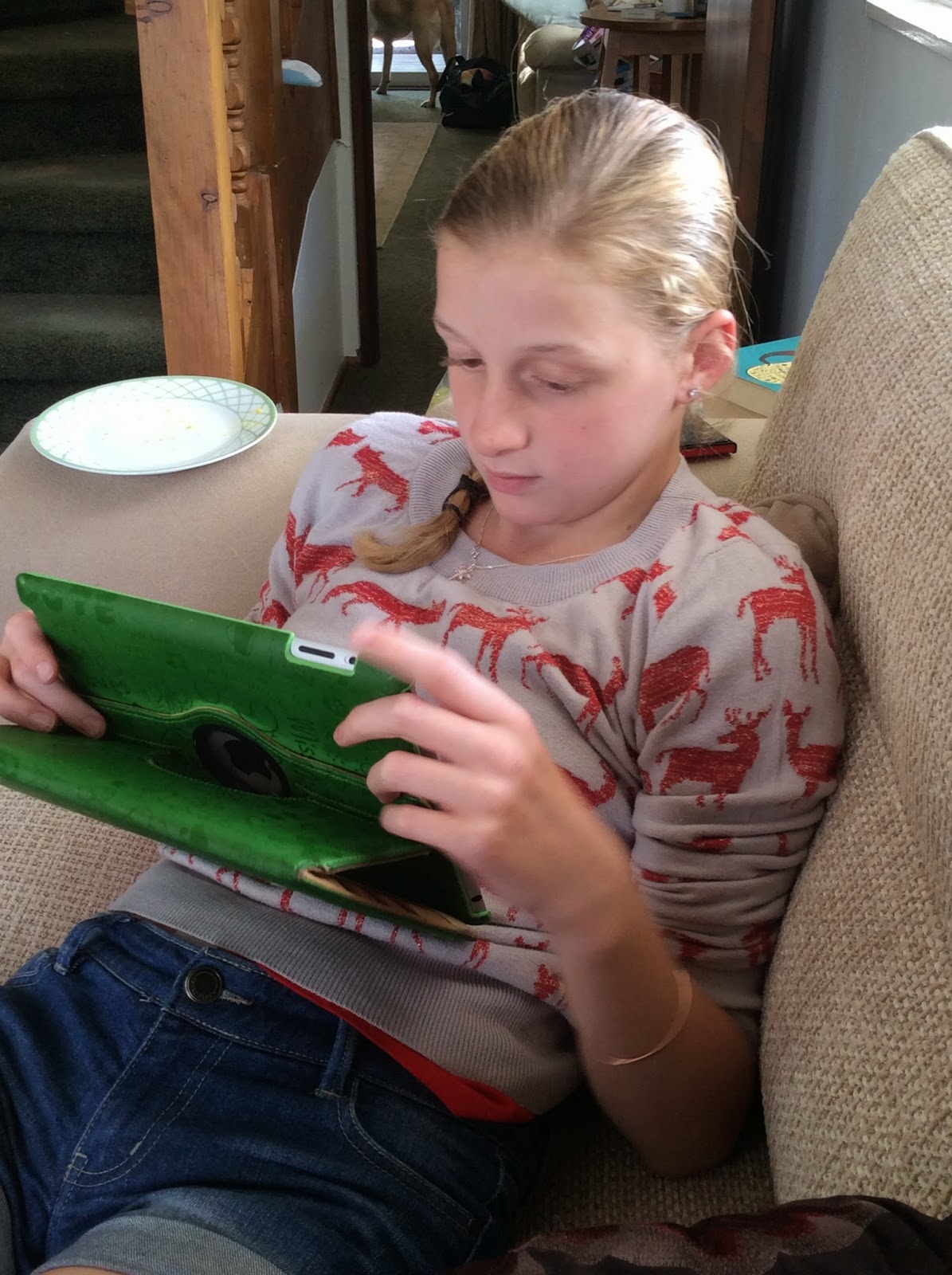 I introduced my granddaughter to blogging over the holidays. Her mother is off touring in the USA and I thought it would be an ideal time for the two of us to work on improving her writing which her teacher tested for and judged (triangulated, no doubt) in a snapshot at the end of the year as "Below the National Standard". Shock, horror!
 So drawing on what little I know about "writing for improvement", we decided to set up her ipad with Blogpress and encourage her blogging with the aim of writing to an authentic audience. Subject matter abounds in the holidays. "Write about your holiday experiences, share with other people and see what they have to say," I urged her. Here is the resulting blog - Hunter's Blog

Initially, I had hoped for 20 views for her blog at the maximum, after all it takes time to build an audience and even more time for the "authentic audience" to respond with some comments. That seems to be a common theme across schools. I wonder who has seen a blog from a successful blogger at intermediate level in New Zealand so that Hunter can compare and contrast?
What I found was her audience was twice as big as mine from the beginning. Oh, Blog Envy, I think it needs to be number eight of the deadly sins. I have begun to question why I do not have a larger audience. Is it because she is 12 and I am 60? How can I cast my net further? Is my writing boring? I suppose I do ramble on about education a lot, is it just something most people are not interested in? Oh well, I suppose it comes back to the purpose of blogging. For me it is reflective. Having said that I certainly do want to share these thoughts with people, after all , its not much fun being an island, is it?
So I can gnash my teeth for the next five months but really it comes down to what have I learned from observing the changes in her attitude to writing?
- I learned it makes a real difference to be able to use technology and not have to rewrite to the teacher's satisfaction, a multitude of edits in handwriting until your hand aches.
- I learned it really does make a difference if you know someone else is going to be reading your writing. There is a sense of urgency in wanting to edit and get it right.
- I learned you really have to think about what you believe (actually I knew this already but it was pleasing to watch this process going on in the young mind)
- I learned you can really make it "your own work" with adding your own images. Adding the right photos has been a fun part of the process, as well as giving a sense of ownership.
- I learned that there are so many teaching opportunities when children write blogs, like the digital citizenship issue that came up when my granddaughter wanted to use an image from Google, (you shouldn't just help yourself to other peoples pictures and, yes, cartoons belong to people, too).
- I learned there are lovely people out there who can really make a difference in a young girl's life by commenting and encouraging and supporting blogging.
- I learned you really can enjoy doing homework in the holidays (actually I knew that already, too, but someone else didn't.)

Yes, Grandma learned a lot these holidays. And I think Hunter did, too. Blog on, Hunter!
Subscribe to:
Posts (Atom)